



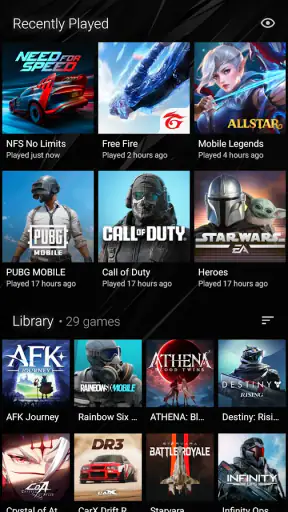
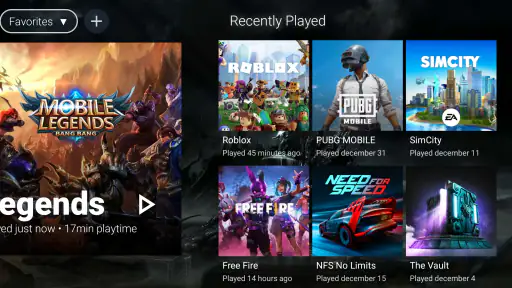
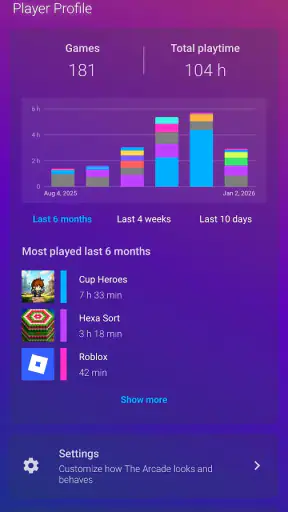

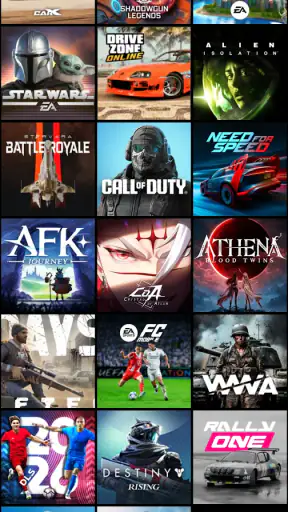
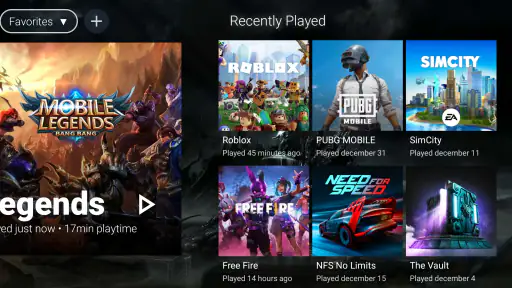
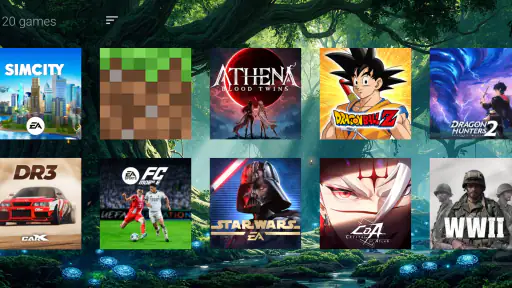
I spent time with The Arcade · Game Hub Launcher as a personalization app, and my first impression was that it is trying to solve a small but familiar problem: making a phone feel more like a dedicated gaming space. Instead of treating games as scattered icons among work apps, messages, shopping tools, and settings, it gives the idea of an arcade-style entrance a central place. That sounds simple, but the value depends on whether you actually want your gaming routine to feel separate from the rest of your phone.
The app comes from Rollerbush and is free to install, with optional in-app purchases priced at $1.99 per item. It is suitable for Everyone, works on Android 8.0 and later, and currently sits at version 4.0.6. Its store summary calls it a personal gaming space, while the shorter description is simply “The Arcade.” I think that plain positioning is useful: this is best understood as a launcher and personalization layer for people who want a more focused way to reach their games, not as a new game in itself.
What makes the arcade idea useful in everyday use
My favorite part of the concept is the change in context. A normal home screen asks me to move between unrelated tasks. A game hub asks me to make a deliberate choice: I am opening this area because I want to play. That separation can be surprisingly helpful when a phone contains many apps and the games I actually use are easy to overlook.
A realistic example is a short evening break. I might have ten minutes before dinner, open the hub, and immediately see the gaming space rather than scrolling through several home-screen pages. The benefit is not that the games become better; it is that the path from unlocking the phone to choosing one becomes more intentional. For someone who plays several small titles, that reduction in visual clutter may be more valuable than another wallpaper or icon pack.
The arcade framing also gives the phone a stronger personality. Standard launchers tend to prioritize efficiency, widgets, folders, and notifications. This app is more about mood and identity. If you enjoy the feeling of having a themed corner for a hobby, the approach is more engaging than simply putting every game into one ordinary folder.
That said, I would not recommend installing it just because you own a few games. If your current launcher already has a tidy games folder and you open only one or two titles, the extra layer may not change your routine enough to justify it. The app makes most sense for people who want a dedicated gaming entrance, not for users searching for a complete replacement for every part of their phone interface.
Setting expectations before you make it your main gaming entrance
The most important distinction is between organization and performance. A launcher can make access feel cleaner, but it does not automatically improve frame rates, reduce loading times, or turn a demanding title into a smoother one. I would judge this app by how well it shapes the start of a gaming session, not by expecting it to optimize the games themselves.
That distinction also affects battery expectations. If you are hoping for a tool that extends play time or manages background activity, this is probably the wrong category of app to explore. Its appeal is visual and organizational. I found it more useful as a front door than as a technical utility.
There is a subtle trade-off here. A dedicated hub can reduce the effort needed to find a game, but it creates another place to maintain. If your library changes often, you may need to pay attention to how the hub reflects those changes and whether its arrangement still matches your habits. A conventional launcher folder is less expressive, but it is familiar and usually requires less thought.
Trust starts with what the app visibly asks you to do
Because a launcher sits close to the way I use my phone, I pay more attention to control and transparency than I would with a casual wallpaper app. I want to know what I am choosing, what can be changed, and whether the app is trying to become more central than I intended. In this case, the practical trust question is not only whether the arcade look is attractive; it is whether I remain comfortable using it as part of my normal navigation.
I would take the setup slowly rather than accepting every option automatically. I prefer to see which screen becomes the entry point, what the app changes, and whether I can return to my previous arrangement without difficulty. That is a sensible habit with any launcher-style product, especially one that changes the way I reach other apps.
The developer is Rollerbush, and the app has built a substantial audience: it has passed one million installs and holds an average rating of 4.5 from around 6.7 thousand ratings. Those figures suggest that the concept has found an audience, but they do not replace personal judgment. A popular personalization app can still be a poor fit if its style or workflow clashes with the way you use your phone.
I also avoid treating the rating as proof of privacy or control. Ratings mainly tell me that many people found enough value to respond positively. For trust, I look at the choices presented during setup, the permissions requested on my device, and the account or purchase prompts that appear during use. Those are the moments where I can make an informed decision rather than relying on a score.
Permissions, accounts, and data-sensitive moments
When I review an app that changes the home experience, I check the operating system prompts carefully instead of granting access on autopilot. A request that is necessary for a visible launcher function is different from a request that feels unrelated to the app’s purpose. I would encourage anyone installing this hub to read each prompt in context and deny anything that does not make sense for the way they plan to use it.
I also look for moments that could reveal more about my habits: opening a game, browsing a library, changing personalization settings, or interacting with a purchase screen. These are the points where I want clear choices and no pressure to continue. If an option is optional, I prefer it to be presented as optional rather than hidden inside a hurried setup flow.
I would not assume that a gaming hub needs an account simply because many modern services use accounts. Nor would I assume that it never does. The sensible approach is to inspect the actual screens on your device and decide whether signing in adds enough value for you. If the app works for your needs without an account, that may be preferable for someone who wants a lightweight personal interface rather than another connected service.
The same caution applies to purchases. The app is free, but optional items cost $1.99 each. I would use the free experience first and decide whether a paid customization genuinely improves my routine. A small individual purchase can be reasonable when it provides a style I will see every day, but I would not buy several items before knowing whether the hub remains part of my regular workflow.
Keeping control when the novelty wears off
One practical test I use with personalization apps is whether I can change my mind. During the first few days, a themed interface can feel fresh, but novelty is not the same as lasting usefulness. I want to know that I can stop using the hub, adjust the arrangement, or return to a standard launcher without feeling trapped by the decision.
For that reason, I recommend treating it as a trial rather than immediately rebuilding your whole phone around it. Keep your normal arrangement in mind, try the arcade workflow during actual gaming sessions, and notice whether you reach games faster or merely spend time admiring the new presentation. That test gives a more honest answer than a quick first impression.
Another useful habit is to separate essential games from occasional ones. Put the titles you open regularly where they are easiest to reach, while leaving rarely played games less prominent. This turns the hub into a practical launch point instead of a visual catalogue that takes longer to scan. It is a small organizational decision, but it makes the difference between a helpful gaming space and a decorative screen.
I would also avoid using it as the only way to access important non-gaming functions. A gaming-focused entrance should remain focused. If notifications, communication, or work tasks are mixed into the same visual area, the purpose becomes less clear and the app loses some of its advantage over a regular home screen.
How it compares with ordinary folders and full launchers
The simplest alternative is a folder on the default launcher. That option wins on familiarity and speed of setup. It is usually enough for someone with a small collection, and it avoids learning another interface. The Arcade is more appealing when the emotional side matters: I want the act of choosing a game to feel like entering a separate space, not just tapping a folder labelled “Games.”
A full replacement launcher may offer broader control over icons, widgets, gestures, and home-screen behavior. That is better for users who want to redesign the entire phone. The Arcade has a narrower purpose, which can be a strength if I do not want to rebuild everything. I see it as a more focused experiment than a complete productivity or customization overhaul.
There is also a trade-off in consistency. A standard launcher is deeply integrated into the phone’s everyday rhythm, while a themed hub may feel more distinctive but less neutral. People who switch constantly between games, work, and communication may prefer the predictable structure of their existing launcher. Players who want a clear boundary around gaming may appreciate the more deliberate atmosphere here.
In my view, the app is strongest for casual and enthusiast players who value presentation and quick access, especially those with enough games that a single folder feels messy. It is weaker for competitive players seeking device optimization, people who dislike themed interfaces, and anyone who wants one launcher to handle every mobile task with minimal visual change.
Who should try it, and who should skip it
I would suggest trying it if your games are spread across several pages, if you enjoy customizing the way your phone feels, or if you want a separate mental space for play. It can also suit families or shared environments where a clear gaming area makes the phone easier to understand, provided each person is comfortable with the launcher choices and permissions shown during setup.
I would skip it if you already have a fast, well-organized game folder and do not care about the arcade presentation. I would also skip it if your main goal is better performance, lower heat, longer battery life, or advanced game management. Those expectations belong to a different kind of tool, and this app should not be judged by benefits it is not designed to provide.
For privacy-conscious users, my recommendation is simple: inspect the prompts, avoid unnecessary access, and do not create an account or make a purchase unless you understand why you want it. That is not a criticism unique to this app; it is the right standard for any product that becomes part of the phone’s navigation. Trust it only to the extent that its visible choices match your comfort level.
My cautious verdict after using the gaming hub
The Arcade · Game Hub Launcher is a focused personalization app with a clear idea: turn the beginning of a gaming session into a distinct, themed experience. I like that it does not need to pretend to be a game or a performance booster to have a purpose. Its value comes from organization, atmosphere, and the feeling that gaming has its own place on the phone.
The free entry point makes it easy to test, while the $1.99-per-item purchases are best approached selectively. I would spend time with the basic experience first, check the controls and prompts on my own device, and see whether the hub genuinely changes how often I find and open my games. If it does, a paid personalization item may be worthwhile; if it does not, there is little reason to invest further.
Version 4.0.6 shows that this is an actively presented app rather than an abandoned experiment, and its Everyone age rating keeps the intended audience broad. Still, those details should not decide the choice for you. The real question is whether you want a gaming-focused doorway or whether your existing launcher already does the job with less friction.
My final recommendation is cautious but positive. I would suggest The Arcade · Game Hub Launcher to someone who wants their phone to feel more like a personal gaming corner and is willing to review setup choices carefully. I would not recommend it to someone seeking technical game optimization or a universal replacement launcher. Used for its actual strength—giving gaming a dedicated, more intentional space—it can be a pleasant addition rather than unnecessary decoration.


